Microsoft Teams analytics that show how collaboration is actually running.
Turn workspace creation, adoption, and sprawl signals into a live portfolio view, so IT and operations leaders can govern the estate with evidence.
Without visibility, governance is a guess.
Most teams know workspaces are being created. Far fewer can say which templates drive adoption, how much of the estate has gone dormant, where ownership gaps have formed, or how much was spun up outside any governance at all. Without that picture, every decision about standardisation, cleanup, and risk stays reactive.
Adoption is invisible
You ship templates and governance policies, but have no clear read on which ones land and which are ignored.
Sprawl goes unnoticed
Dormant workspaces accumulate quietly, inflating storage and burying the workspaces people actually need.
Risk hides in the estate
Ungoverned or guest-exposed workspaces don't announce themselves; they surface during an audit, not before.
Cleanup gets deferred
Without evidence of what's dormant, the case for archival and remediation never makes it onto the roadmap.
The signals that matter.
Analytics organises the estate around the questions leaders actually ask (adoption, activity, sprawl, ownership, and governance posture) instead of a flat tenant-wide count that tells you nothing about whether the work is running well.
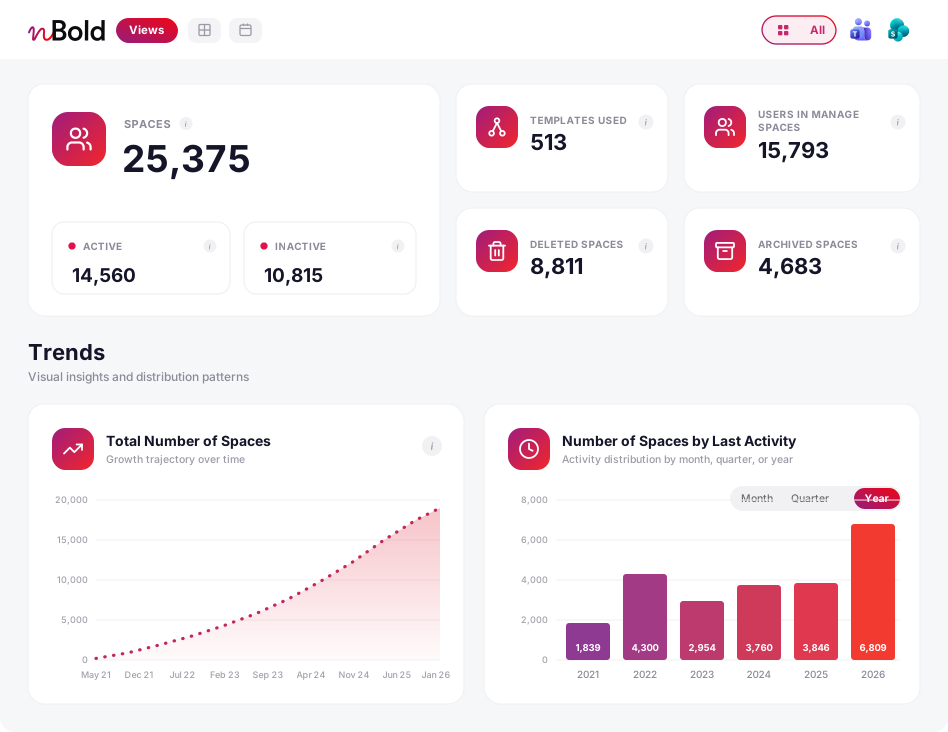
Template usage
See which templates teams actually reach for and which sit unused. Evidence for what to standardise next, and what to retire.
Workspace activity
Understand where collaboration is live and where it has gone quiet, across the whole estate rather than one workspace at a time.
Sprawl signals
Spot the accumulation of workspaces that get created and never cleaned up. These are the workspaces inflating storage and clouding search.
Inactivity signals
Identify workspaces with no recent activity, the leading indicator for archival, owner outreach or cleanup.
Governance posture
See how much of the estate is created from governed templates versus ungoverned, ad-hoc workspaces.
Portfolio view
One estate-wide picture for IT and operations leaders. Not a per-user dashboard, but the shape of collaboration overall.
Report by the dimensions that drive decisions.
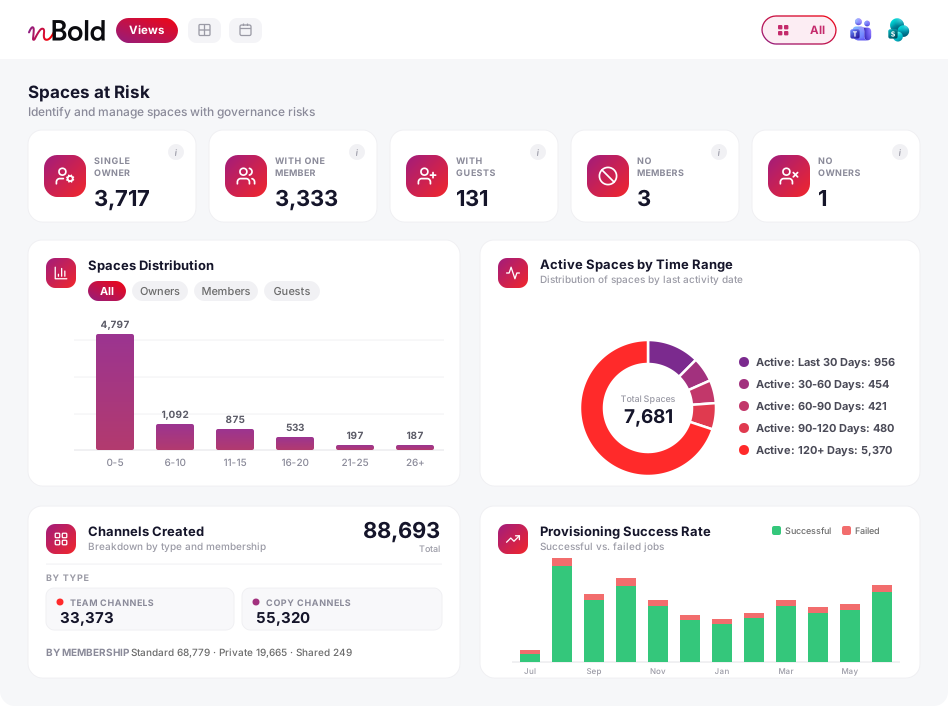
Look at the portfolio through the lens that matters for the decision in front of you: adoption by template, dormancy by activity status, exposure by guest access, coverage by governance posture.
From insight to action
Analytics is not a dead end. Inactivity signals can become a scheduled lifecycle rule. A list of stale, ungoverned, or guest-exposed workspaces can be handed straight to bulk operations and remediated in a single pass. The picture you see is the starting point for cleanup and improvement, not just a report you file away.
From signal to action.
A simple loop that keeps the estate healthy and governance posture improving, without turning it into a full-time monitoring job for IT.
See the estate
Open a portfolio view of every workspace you manage: usage, activity, age and governance status in one place.
Spot the pattern
Filter to what's relevant: templates that aren't landing, workspaces gone dormant, or anything created outside governance.
Act on it
Route inactivity into a lifecycle rule, or send a matched set of workspaces to bulk operations to archive, govern or clean up.
A portfolio view for decision-makers, not surveillance.
Analytics is built to inform estate-level decisions for the people who manage the collaboration estate (Teams Service Admins, Global Admins, and operations leaders), not to monitor individual employees.
nBold acts on your Microsoft 365 tenant through the Microsoft Graph API, under a service account you control. ISO 27001 certified and SOC 2 Type II certified.
Part of the same platform.
Analytics tells you where the estate needs attention. Lifecycle management and bulk operations let you act on it, all inside the same governed Microsoft 365 environment, with every action recorded.
Lifecycle management
Turn inactivity signals into automated detection, owner notification, and archival, configured per template, no manual chasing.
Explore Lifecycle managementBulk operations
Act on what analytics surfaces: archive, clean up, or attach governance to matched workspaces in a single pass.
Explore Bulk operationsGovernance
Naming, labels, membership, approvals, and lifecycle — applied per template so every workspace is governed from the moment it is created.
Explore GovernanceFrequently asked questions
What should workspace analytics show?
Creation trends, template adoption, inactive workspaces, governance status, lifecycle signals, ownership gaps, and remediation opportunities. These are the signals IT and operations leaders need to make decisions about the collaboration estate rather than guess.
Is this a replacement for the Microsoft 365 admin reports?
No. Microsoft reports tell you about the tenant as a whole. nBold organises the same kind of signal around the workspaces and templates you actually manage (adoption by template, sprawl by activity status, governance coverage) rather than a flat tenant-wide number.
Does any of our data leave our environment to produce these insights?
nBold is built to enterprise security standards (ISO 27001 certified and SOC 2 Type II certified) and acts on your Microsoft 365 through the Microsoft Graph API under a service account you control. See our Security & compliance page for the full detail on how nBold handles data.
Who uses analytics?
IT, digital workplace teams, operations leaders, PMOs, and business owners who need visibility into repeatable collaboration patterns across the estate. Regular end users do not see a portfolio view of other people’s workspaces.
Can analytics improve templates?
Yes. Template adoption and workspace usage show which playbooks are working, where the approach needs adjustment, and which templates teams reach for when they have the choice. That evidence drives better standardisation.
See how collaboration is actually running — then act on it.
See how nBold turns workspace usage and adoption signals into decisions IT and operations leaders can act on across a real Microsoft 365 tenant.