Microsoft Teams templates that start every project ready to work.
nBold provisions the complete Teams workspace from one template — channels, Planner board, SharePoint, and governance — so every project starts ready to work.
Stop rebuilding the same workspace every time.
Repeatable work deserves a repeatable setup. When every new Team is assembled by hand, the structure drifts, files end up wherever, and the plan starts from a blank board. A template makes the right setup the default — so people spend their first hour on the work, not on the workspace.
Consistency by default
Every workspace for a given scenario is laid out the same way — owners and members always know where things live.
Minutes, not hours
A complete environment is provisioned in a single pass instead of being assembled channel by channel.
No blank-page start
The Planner board, the document structure and the apps are already in place when the team arrives.
Governed from the start
Naming, labels and membership rules ride along with the template — compliant without anyone thinking about it.
One template provisions the whole workspace.
Not an empty Team with a name — a complete, structured environment, every artifact in place and ready to use.
Channels
Standard, private and shared channels laid out as the scenario needs — so the conversation is already organised before anyone joins.
Tabs and integrated apps
The tabs and apps each channel relies on, pinned in place — dashboards, reference docs, line-of-business tools — no manual setup per Team.
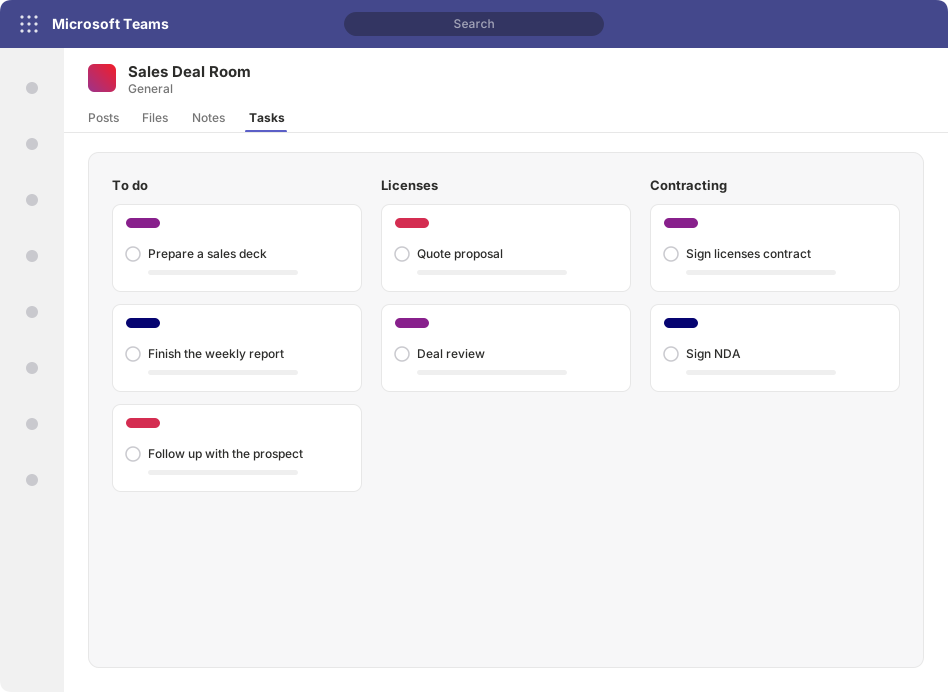
Planner board with tasks
A Planner board with buckets and tasks already defined, so the plan exists the moment the workspace does.
Connected SharePoint site
The SharePoint site behind the Team, with its libraries, folders and metadata structured from the start.
Lists
Microsoft Lists for trackers, registers and structured data the team works from — provisioned with their columns and views.
OneNote and Forms
A OneNote notebook for shared notes and a Form for intake or feedback — included where the scenario calls for them.
From a one-time build to a repeatable motion.
Define the workspace once, govern it, publish it — then let it run.
Encode the workspace once
Capture the channels, tabs, apps, Planner board, SharePoint structure, Lists, OneNote and Forms as a reusable template — the way this kind of work should always be set up.
Apply governance to the template
Attach naming conventions, sensitivity labels, privacy and membership rules so every workspace created from it stays compliant by design — guardrails, not afterthoughts.
Publish to a self-service catalogue
Make the template available to the people who need it, with optional approval, so they request a workspace instead of opening a ticket.
Provision in one pass
A complete, governed Team and its connected SharePoint site appear ready to work — every artifact in place, every time.
Part of the wider platform.
Teams templates are one expression of nBold's templating engine. The same model provisions standalone SharePoint sites, standardizes individual channels, and applies governance and lifecycle — building blocks your teams use every day, encoded once and enforced on every workspace.
Templates
The templating engine that captures how a motion runs — Teams, SharePoint, or both, governed from one definition.
Explore TemplatesChannel templates
Standardize work inside existing Teams — channel structure, tabs, and apps — without creating unnecessary new workspaces.
Explore Channel templatesSharePoint provisioning
Provision structured SharePoint sites — libraries, lists, pages, and metadata — standalone or alongside a Team.
Explore SharePoint provisioningnBold acts on your Microsoft 365 tenant through the Microsoft Graph API, under a service account you control. ISO 27001 and SOC 2 Type II certified.
Frequently asked questions
What can a Teams template include?
The full workspace — not an empty shell. Channels (standard, private, and shared), the tabs and integrated apps each channel needs, a Planner board pre-loaded with tasks, a connected SharePoint site with its document structure, plus Lists, OneNote, and Forms. Everyone lands in the same place, set up the same way, ready to work from the first minute.
How is this different from native Microsoft Teams templates?
Native Teams templates help with basic structure. nBold provisions the complete working environment — channels, tabs, apps, a Planner board with tasks, the connected SharePoint site and its libraries, Lists, OneNote, and Forms — and applies governance such as naming conventions and sensitivity labels at the same time.
Can business teams request Teams themselves?
Yes. Templates are published to a self-service catalog. Business users request a workspace from a template, with optional approval and naming guardrails applied automatically — so provisioning scales without a ticket to IT for every new Team.
Can a template include pre-populated Planner tasks?
Yes. A template can carry a Planner board with its buckets and tasks already defined, so a new project, onboarding, or deal room starts with the plan in place rather than a blank board the owner has to rebuild every time.
Does provisioning a Team also create a SharePoint site?
Yes. Every Microsoft Team is backed by a SharePoint site, and an nBold template provisions that site with its libraries, folders, and metadata in the same pass — so documents are structured and findable from day one, not left to each owner to improvise.
Make the right setup the default.
See a complete Microsoft Team — channels, Planner board, SharePoint site and apps — provisioned from a single template in one pass.