Microsoft 365 workspace templates that run every motion the same way, every time.
Encode your best-run project, deal, or account workspace once — nBold provisions the same complete Microsoft 365 environment every time, whoever starts it.
The cost of starting from a blank workspace.
Repeatable work deserves a repeatable setup. When every new project or deal begins with an empty Team and a manual build, the structure drifts, onboarding slows, and nobody is sure where things belong. The same effort gets re-spent on every launch.
Setup is reinvented
Each workspace is assembled by hand, so the same channels, libraries and boards get rebuilt from scratch every time.
Quality is uneven
What the workspace contains depends on who created it — and what they remembered to add that day.
Onboarding slows
New joiners face a different layout in every team and relearn where documents, tasks and notes live.
The standard erodes
Best practice that lives in people's heads leaves with them. Nothing reinforces how the motion is meant to run.
The template is the operating unit.
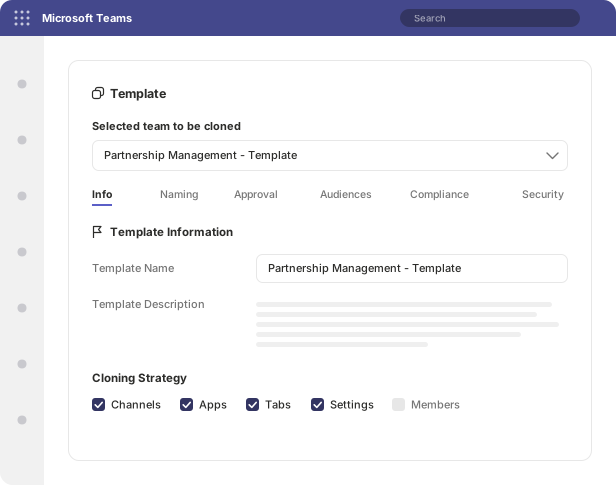
It captures how a motion runs — not just a name and a couple of channels, but the entire structured workspace. One template reproduces all of it together, every time.
Channels
Define the Teams channel structure up front — standard, private or shared — so every workspace opens with the right conversations already in place.
SharePoint site
A complete site with document libraries, metadata columns, site pages and navigation — provisioned with the workspace, not assembled afterwards.
Planner boards
Boards pre-loaded with buckets, tasks and checklists so the motion starts with its plan, not a blank board.
Microsoft Lists
Structured lists for tracking — risks, intake, inventory, approvals — created with the columns and views the motion needs.
OneNote sections
Notebooks and sections laid out for the work, ready for meeting notes, decisions and reference material from day one.
Forms for intake
Embedded Forms to capture requests, briefs or onboarding details consistently at the start of every workspace.
Files & documents
File and folder structures plus pre-populated documents — briefs, charters, checklists — so the right starting content is already there.
Apps & tabs
Integrated apps and tabs pinned into the workspace, so the tools the team relies on are present without manual configuration.
A template can provision a Team on its own, a standalone SharePoint site without a Team, or both together from a single definition — with governance applied to the workspace it produces.
Encode once, provision consistently.
From the motion in someone's head to a complete workspace anyone can create on demand.
Capture the motion once
Build the workspace the way it should run — channels, SharePoint structure, Planner, Lists, documents and apps — and save it as a template. The motion is now encoded, not tribal knowledge.
Provision from the template
When a new project, deal or account starts, the person responsible picks the template. A complete, ready-to-use workspace is created in a single motion.
Maintain centrally as it evolves
Refine the template as the motion improves. Every future workspace inherits the change — the standard gets better without touching what already exists.
One engine, every repeatable motion.
Any scenario that runs the same way more than once is a candidate for a template — structured the first time, reproduced consistently after that.
Part of a single platform.
The template defines the workspace. Governance attaches the guardrails, and provisioning brings it to life — across Teams, SharePoint, or both. Each capability builds on the same model.
Teams templates
Provision Teams from templates — channels, Planner, Lists, OneNote and Forms, ready on creation.
Explore Teams templatesSharePoint provisioning
Stand up complete SharePoint sites — libraries, metadata, pages, and navigation — standalone or alongside a Team.
Explore SharePoint provisioningGovernance
Naming, labels, membership, approvals, and lifecycle — applied per template, automatically, governed by default.
Explore GovernanceFrequently asked questions
What is the nBold templates engine?
It is the model behind nBold provisioning. A template captures the full workspace: Teams channels, a SharePoint site with document libraries and metadata, Planner boards with tasks and checklists, Microsoft Lists, OneNote sections, Forms for intake, file and folder structures, pre-populated documents, and integrated apps and tabs. One template reproduces all of it together every time the work begins.
Can one template support different workspace shapes?
Yes. A template can produce a standalone SharePoint site — libraries, lists, site pages, navigation, and metadata — without a Team, provision a Team on its own, or create both together. Whatever the motion actually needs.
How does a template stay consistent regardless of who provisions it?
Everything that defines the workspace lives in the template, so the person who provisions chooses the template rather than rebuilding structure by hand. The result is the same complete, ready-to-work environment every time — with no manual setup to forget and no variation by creator.
Can templates evolve over time?
Yes. Templates should evolve as the business playbook changes. Maintain them centrally and every future workspace inherits the improved model — the standard gets better without touching what is already in use.
Do templates carry governance, or is that separate?
Governance is applied per template — naming conventions, sensitivity labels, membership rules, privacy, and lifecycle travel with the workspace the template produces. Structure and guardrails are provisioned together, not bolted on afterwards.
Turn your best motion into the default.
See nBold provision a complete workspace from a single template — channels, SharePoint, Planner, documents and all — in one motion.