Build CRM-to-workspace automation — without custom development.
Configure Salesforce and HubSpot-to-Teams workspace automation yourself — trigger, conditions, template, and membership mapping — no Power Automate, no custom code.
Automation that keeps pace with the business.
Most CRM-to-Teams automation is built once, in a tool only IT can touch. The sales motion evolves — a new stage, a different deal type, a membership rule — and the automation falls behind because the people who own the process cannot safely change it. The flow builder closes that gap: the operators who run the revenue motion configure it directly, in a visual canvas, with guardrails already in place.
Owned by RevOps
Sales operations and enablement define and adjust flows themselves — no developer, no Power Automate, no queue. IT grants consent once.
Changes in minutes
A new stage or template is a setting in the canvas, not a project. The automation keeps pace with the business motion.
Governed by default
Every flow provisions from an nBold template, so naming, labels, and lifecycle are applied automatically — every workspace, every time.
Four steps from CRM event to governed workspace.
Define the flow once in the visual builder. It runs automatically every time the CRM event fires.
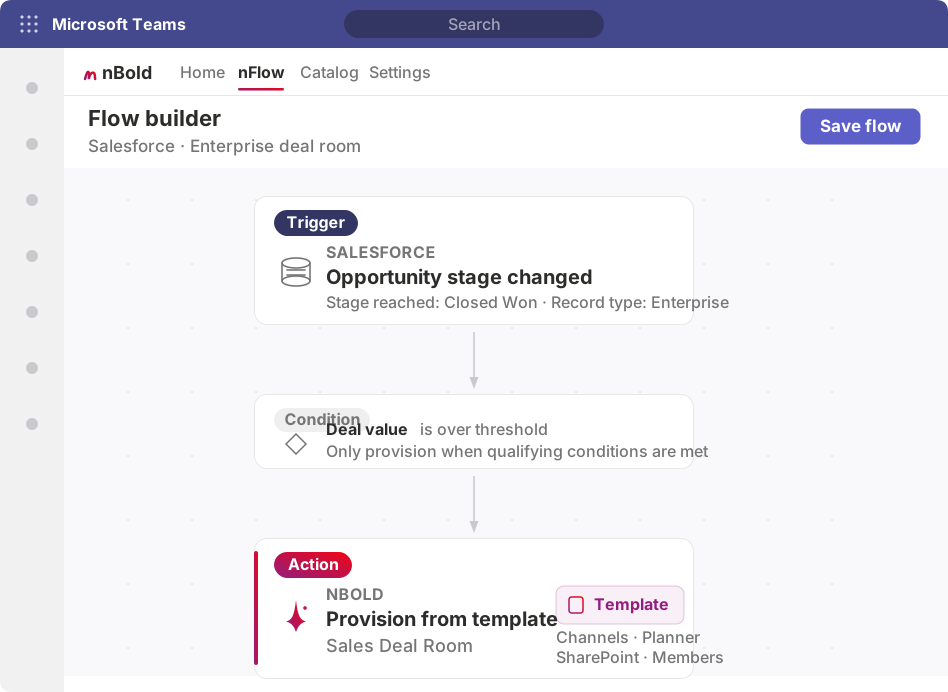
1. Choose the CRM event
Pick the trigger that starts the motion — a new opportunity, a stage change, a record creation, or a field update — in Salesforce or HubSpot.
2. Set conditions
Add the rules that decide when to provision: deal value over a threshold, a qualifying stage reached, a specific record type or owner. The right records get a workspace; the rest do not.
3. Choose the template
Select the nBold template to provision — its channels, Planner tasks, SharePoint document structure, and governance travel with the workspace, ready to use from the first minute.
4. Map roles and fields
Map CRM roles to workspace membership and CRM fields to the workspace name, metadata, and pinned context. The account executive, solutions engineer, and CSM land in the right workspace automatically.
No Power Automate. No custom development. No IT ticket every time the sales process changes — an administrator grants app consent once, and RevOps owns the flows from there.
What the flow provisions — a complete workspace, not a notification.
When the flow fires, nFlow stands up a ready-to-work, governed workspace from the template you selected — not a channel-creation request, not a single pinned tab.
Channels
Structured to your sales motion — discovery, proposal, legal, onboarding — so every deal starts with the same ready-to-work shape.
Planner tasks
Start with the plan already in place: task lists per stage, assignments, and due dates that reflect your standard deal execution process.
SharePoint structure
The right folder structure and file templates from day one — proposals, questionnaires, contracts, and SOWs. Not a blank library.
CRM record pinned
The Salesforce opportunity or HubSpot deal pinned as a tab, so the live record is one click away. The CRM stays the source of truth.
Membership from CRM roles
The people on the CRM record added to the workspace by role — no manual lookups, no missed stakeholders, no one left out.
Governed by default
Sensitivity labels, naming convention, and lifecycle policy inherited from the nBold template. Business teams move faster. IT keeps control.
Beyond what the native CRM apps provide.
The native Salesforce app for Teams handles notifications and record search. The flow builder provisions the complete, governed workspace those deals get worked in.
| Capability | Native CRM app for Teams | nFlow flow builder |
|---|---|---|
| Notifications in Teams from the CRM | Yes | Yes |
| CRM record search in Teams | Yes | Yes |
| Provision a workspace per CRM event | — | Yes |
| Channel structure from your sales motion | — | Yes |
| Planner board per stage | — | Yes |
| SharePoint document structure | — | Yes |
| CRM record pinned as a Teams tab | — | Yes |
| Membership synced from CRM roles | — | Yes |
| Governance (naming, labels, lifecycle) | — | Yes |
| No-code flow builder for RevOps | — | Yes |
nFlow provisions through the Microsoft Graph API under a service account you control, and every provisioned workspace lives in your Microsoft 365 tenant. ISO 27001 and SOC 2 Type II certified.
Part of the nFlow motion.
The flow builder is where flows are defined. Explore how the same builder connects to Salesforce and HubSpot, or step back to the full nFlow overview.
nFlow overview
How CRM events provision governed Teams workspaces — the full motion from trigger to ready-to-work room.
Explore nFlow overviewnFlow for Salesforce
Deal rooms, account workspaces, and opportunity-team membership sync triggered by Salesforce events.
Explore nFlow for SalesforcenFlow for HubSpot
Deal desks and deal rooms provisioned from HubSpot deal stages and custom properties.
Explore nFlow for HubSpotFrequently asked questions
Who configures flows — IT or sales operations?
Sales operations, RevOps, and sales enablement teams configure and adjust flows themselves. When the sales process changes — a new stage, a different membership rule, a new template for enterprise deals — they edit the flow in the builder without raising an IT ticket. IT involvement is limited to the one-time consent in your Microsoft 365 tenant.
Does the flow builder require Power Automate or custom development?
No. The flow builder is a no-code visual canvas. You define the trigger, conditions, template, and field mappings by selecting from your CRM schema and your nBold template catalog — no Power Automate flows, no scripts, and no developer involvement.
What CRM events can trigger a flow?
A flow can be triggered by a CRM event such as a new opportunity, a stage change, a record creation, or a field update. You add conditions — only provision when deal value crosses a threshold or a qualifying stage is reached — so workspaces are created for the right records, not every record.
Can different conditions provision different templates?
Yes. Conditions branch to different nBold templates. A small commercial deal can map to a single-channel workspace, while an enterprise opportunity maps to a full deal room with multiple channels, a SharePoint document structure, and a Planner board — all decided by the conditions you set in the same flow.
Does building a flow expose or store CRM data?
No. nFlow reads CRM trigger events to decide when to provision and which fields to map. The provisioned workspace and the pinned CRM tab live in your Microsoft 365 tenant. nBold is ISO 27001 and SOC 2 Type II certified.
Let RevOps own the automation — without IT in the loop.
See how the nFlow flow builder lets sales operations configure a CRM trigger, choose the template, map membership, and watch a governed workspace provision automatically.