nBold Summer 2026 Update: Template Agent, Channel Templates, SharePoint Site Templates GA and a Sturdier Platform
nBold exists to turn the work that runs your business into governed workspaces that arrive ready to work, instead of a blank page rebuilt by hand every time. Summer is when a lot of that backlog gets done — quieter calendars, fewer meetings, more room for the unglamorous work that never fits between deals. This summer we started moving nBold toward a more agentic way of working — the Template Agent is the first step — while Channel Templates reached general availability, SharePoint Site Templates followed, and a good part of the season went into reliability and security work. Here is what changed.
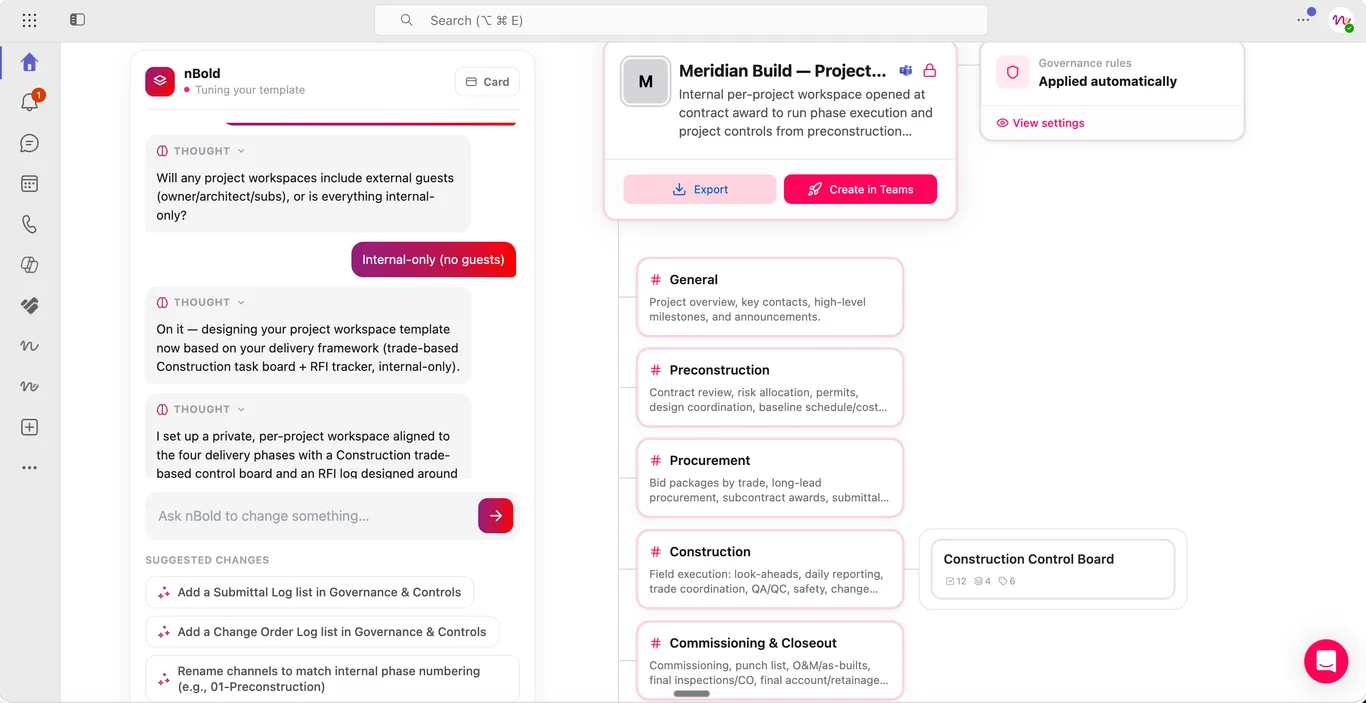
01 Templates: Template Agent (beta)
Building a proper template by hand still means capturing all of it yourself: naming conventions, channel structure, a Planner board, the right Lists, sensible governance — painstaking work that can eat hours per scenario. The Template Agent collapses that into a single sentence: describe the workspace you need, something like “project kickoff for consulting deals,” attach a file, or point the Agent at a web page as source material, and in minutes it drafts the whole template, ready for a Catalog Manager or Global Admin to review. Every draft stays in your history, so you can browse earlier templates, reopen one to keep refining it, or start a new one without losing the last. It is the first of several agent capabilities we are building into nBold.
Nothing goes live automatically. The output is always a draft, and a Catalog Manager or Global Admin has to review and publish it before anyone can provision from it. Every generation and every edit is logged, so there’s a full audit trail of what the Agent proposed and who approved it. The Template Agent is in beta, available for early access while nBold collects feedback. Read the full story in the Template Agent post.
02 Channels: Channel Templates, now generally available
Repeatable collaboration doesn’t stop at the whole-team level — it applies just as much to a single channel. Every new deal or project still needs the same files and folders, the same Planner board, the same Lists and OneNote pages, and until now someone had to rebuild that by hand each time, drifting a little more with every copy.
Channel Templates lets a catalog manager define that structure once — files and folders, a Planner board, Lists, and OneNote pages, bundled together — so end-users can provision a fully-built channel from the catalog, inside the nBold Teams tab, in one action instead of assembling it themselves. Channel Templates is generally available to all customers. More detail in the Channel Templates post.
03 SharePoint: Site Templates are generally available, and provisioning got sturdier
SharePoint Site Templates, in beta since January, is now generally available. The GA release brings site type selection (Communication or Team site), automatic cloning of the source site’s assets library, broader support for the SharePoint sites behind private and shared channels, more reliable design fidelity, and provisioning that no longer times out on large sites — big libraries and rich metadata schemas now provision in the background with live progress. Full detail in the GA announcement.
Alongside the GA push, we fixed a bug where a provisioned site could end up missing its Documents library from the left navigation, or with library quick-launch settings not carried over from the source, even though the provisioning job reported success — a customer flagged it, we root-caused it to two defects in the navigation-rebuild step, and fixed both.
The SharePoint sites that back private channels also went through a reliability hardening pass this summer.
Hub site assignment for templates is now available: in a template’s Compliance settings, an admin can tick “Assign the workspace to a hub site” and pick a hub, and every SharePoint site provisioned from that template joins that hub automatically — no manual step in SharePoint admin afterward. Bulk can also join existing sites to a hub. Details in the hub site assignment post.
04 Everyday quality: the small things you’ll notice
A long list of smaller fixes landed across the platform this summer:
- Bulk’s grid now shows proper loading states, and switching between workspaces no longer glitches on the way in.
- Home page Teams search now matches anywhere in a team’s name, not just the start — searching “117” now finds “Project 117 – Sales.”
- Clicking a team card on the home page no longer silently reloads the page when Microsoft Graph has an auth hiccup.
- The audience targeting rule builder no longer flickers, handles several conditions on the same field correctly, and no longer breaks on names with apostrophes.
- Job history progress bars on
/historynow update live instead of requiring a page reload, and the “running” state actually shows progress instead of appearing empty. - Template, team, channel, and SharePoint gallery cards now clamp long titles and render their icons correctly instead of falling back to a generic avatar.
- Settings → Update permissions now actually saves, closing a silent no-op bug.
05 Security: nBold for Teams is now Microsoft 365 Certified
On August 28, Microsoft awarded nBold for Teams the Microsoft 365 Certification, the highest tier of the Microsoft 365 App Compliance Program: an independent review of the app’s security and compliance controls and of the practices behind it. It joins our ISO 27001 and SOC 2 Type II certifications and closes a summer of hardening, including an independent penetration test with every finding fixed, tighter security headers and cross-origin policy, and patched dependencies. Nothing to configure on your side; the status appears in the compliance information Microsoft publishes for the app. Read what the certification means or see security and compliance.
Also new: a rebuilt nbold.com
The website was redesigned from the ground up this summer, on a new address: nbold.com (nboldapp.com now redirects). English and French throughout, every blog article kept at its old URL, new platform, solution and industry pages, a Microsoft 365 collaboration glossary and a resource center.
In case you missed it
A few releases from earlier this year, if you missed them: the Analytics dashboard surfaces provisioning health, spaces at risk, and storage hot spots, and lets you jump straight into a pre-filtered Bulk action to fix what it finds. Audience Targeting means each user only sees the templates meant for them, based on Entra ID attributes and group membership. And Bulk actions for channels and SharePoint sites extended Bulk beyond whole teams to standalone channels and SharePoint sites.
What’s next
The Template Agent stays in early access while we keep collecting feedback ahead of general availability — talk to your nBold contact if you want to try it on your own tenant.
Related
See how templates, channel structure, and SharePoint provisioning fit into the wider governance model on the platform overview, Channel Templates, and SharePoint provisioning pages, or read about how we keep the platform secure on platform security. Ready to see it on your own tenant? Book a demo.